


Moment Weather
4.45.00 Reviews
App Specs
- Version
- 1.0.4
- Updated On
- License
- Free
- Downloads
- 10,000+
- Developer
- Odunaike
- Categories
- Weather
- Platform
- Android
Screenshots
 Analysis by AppCompare
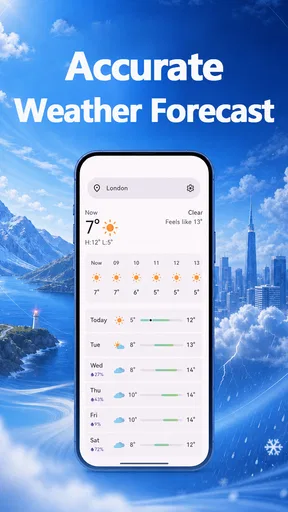
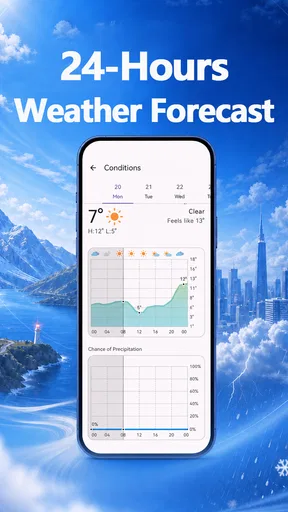
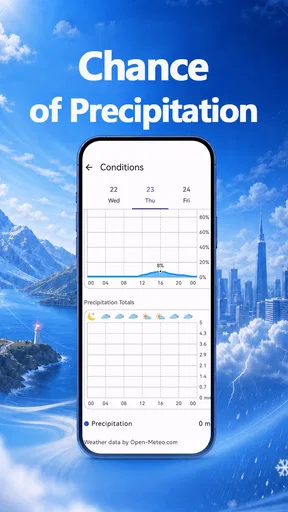
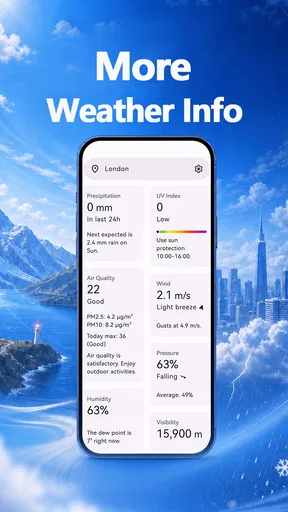
I like weather apps best when they help me make a decision without asking me to treat a forecast as a promise. Moment Weather is a free weather app from Odunaike, built around checking conditions by the hour and by the day, with more detailed weather information available alongside the forecast. That makes it a practical option for ordinary planning: deciding when to leave, whether an outdoor errand can wait, or how much confidence to place in the day ahead.
My first impression is that the app’s appeal rests on a clear, useful routine rather than a long list of claims. You can use it to get a near-term view before heading out, then look further ahead when arranging the week. The distinction matters: hourly forecasts are more helpful for timing a walk or commute, while a daily outlook is better for broad plans. I would treat both as guidance and check again when the weather could change what I do.
Trust begins with what the forecast can—and cannot—do
I use this section to separate the forecast’s practical value from the certainty we might wish it offered. Hourly and daily views can help me compare options, but they cannot make changing conditions fixed; the next section looks at how I would assess the choices and controls visible in the app before relying on it.
A useful forecast is not a guarantee
Weather is local and changeable, so I judge an app less by whether it sounds certain and more by whether its information helps me plan sensibly. Moment Weather puts hourly and daily forecasts together with detailed weather data, giving me more than a single glance at the day’s headline conditions. The value is in having different time horizons to consult, not in assuming that every forecast will play out exactly as shown.
For a routine trip, I would look at the hours around departure rather than relying only on a general daily summary. If I were planning an outdoor activity several days away, I would use the longer view to spot a potential weather issue, then revisit the forecast closer to the time. That simple habit is especially useful when a decision has a cost—such as carrying equipment, changing travel plans, or choosing an indoor alternative.
There is a trade-off here. More detailed weather information can help answer specific questions, but it also asks the user to interpret more than a basic sun-or-rain symbol. If you only want a quick glance and rarely act on the details, the added information may not make your routine better. If you like checking conditions at different times of day, the combination is more worthwhile.
What I look for before relying on an app
Weather apps can encourage a sense of precision that forecasts do not always deserve. I would use Moment Weather as a planning aid, not as the sole basis for a decision where conditions could affect safety. For example, before a long drive or a strenuous outdoor outing, I would check the forecast again near departure and use appropriate local guidance when conditions are serious. This is not a criticism unique to this app; it is a sensible boundary for any weather forecast.
Worth Reading Before You Choose

Baby Panda World Brings Quick Play to Modern Phones, but Its Game Library Feels Busy

ESPN’s Live Game View Makes Following Close Games Easier

QuizzLand Review: A Good Fit for Short Trivia Breaks, Not Every Player

Basketball Stars: Multiplayer Is Fast, but Can It Recover When Matches Go Wrong?

WEBTOON Turns Phone Updates Into a Better Reading Routine

Link to Windows Runs on Shared Habits, Not Social Feeds
For everyday errands, the decision can be lighter. If the hourly view suggests a better window for walking the dog or carrying groceries, I can adjust my timing without needing perfect certainty. The practical question is not whether the app can remove uncertainty, but whether it gives me enough context to make a reasonable choice.
Controls and information I can actually assess
I prefer to be careful about privacy claims. The app’s weather purpose tells me what kind of information I want to see, but it does not by itself establish what permissions are requested, how information is handled, whether an account is required, or which privacy controls are available. I would check the permission prompts and the app’s visible settings on my own device before deciding how to use it. I would not assume that any particular control exists without seeing it.
That cautious approach is useful for any app that may involve location. If a permission prompt appears, pause and consider whether the choice fits your needs; if the app offers a manual way to choose a place, that may suit someone who prefers not to share device location. I am describing a decision-making approach, not claiming that Moment Weather offers a particular location mode or permission setting.
Likewise, I would look for clear choices before entering personal details or creating an account. A weather tool may be useful without becoming part of a larger online routine, but the presence or absence of account options should be judged from what the app actually displays. For me, the important standard is straightforward: understand the choice before granting access or sharing information.
Small workflows that make the forecasts more useful
One habit I find more valuable than repeatedly refreshing an app is checking a forecast at the point when it can change my plan. For a morning commute, I would review the relevant hours before getting ready, rather than staring at the whole day’s forecast the night before. If the timing looks uncertain, I would build in a flexible departure window instead of treating one predicted hour as exact.
A second useful workflow is to separate the decision from the detail. Start with the daily forecast to decide whether an outdoor plan is broadly sensible, then use the hourly outlook to choose when to do it. This keeps detailed information from becoming a distraction. It also makes the app’s two forecast horizons work together rather than competing for attention.
A third is to use the longer outlook as a prompt to prepare, not a reason to lock in a plan. If a day looks unsettled, I might identify an indoor backup or avoid leaving a time-sensitive task until the last moment. Then I would check again as the date gets closer. That approach makes forecasts useful even when they shift: they help me preserve options rather than pretend uncertainty has disappeared.
Everyday use, and where another option may suit you better
Imagine I have a free afternoon and want to walk across town. I would check the daily view first to see whether the day looks broadly workable, then look at the hours surrounding the walk before choosing when to go. If the weather looks marginal, I can shorten the outing or carry a layer. That is a modest use case, but it is exactly where a straightforward forecast app can earn a place in my routine.
Moment Weather is also a reasonable fit for someone who wants a simple weather app rather than a full planning system. It is rated 4.4 on average, with around 87 ratings, and has over 10,000 installs. Those figures offer a little context about its audience, but they do not tell me whether its forecasts will suit a particular location or whether its controls match an individual’s privacy preferences.
It is free and rated for Everyone, which makes trying it a low-cost way to see whether its presentation works for you. The app is at version 1.0.4 and requires Android 9 or later. I would still judge it by the experience on my own device: whether the forecast is easy to find, whether the details answer my questions, and whether the app’s prompts and settings feel clear.
Compared with a basic weather widget, the main reason to open Moment Weather is its combination of hourly and daily views with detailed weather information. Compared with a broader weather service that bundles maps, alerts, radar, or other tools, it may be less suitable if those features are essential to your routine. I would not choose an app based on a feature I have not confirmed; instead, I would identify the specific information I need and see whether Moment Weather actually presents it clearly.
Who should give it a try—and who should pause
I would recommend Moment Weather to someone who checks the forecast to make small, practical timing decisions and prefers having both near-term and day-level views. It may be especially useful if you are willing to revisit a forecast rather than expecting one check to settle a plan days in advance. The detailed information is most valuable to a curious user who wants context, not merely a quick icon.
I would be more hesitant to recommend it to someone who needs a particular specialist feature, depends on highly specific alerting, or wants a firm answer for a safety-critical decision. In those cases, compare the app’s actual tools with the requirements of your situation, and consult relevant local sources when appropriate. I would also suggest pausing if you are uncomfortable with a permission request or cannot find a clear explanation of a choice that matters to you.
Odunaike’s app is worth considering as a focused, no-cost way to check the weather across different parts of the day. My cautious verdict is positive: the hourly and daily outlooks give it a useful role in ordinary planning, while the best results come from treating forecasts as changeable and checking the app’s visible choices for yourself. Moment Weather makes sense for people who want practical context before heading out, but I would choose another option if a specific tool or a clearly verified privacy control is essential. In short, I would try it for everyday decisions, keep a backup plan when conditions matter, and let the forecast inform—not dictate—what I do.
Pros
- Clean interface makes current conditions easy to check at a glance.
- Hourly and daily forecasts help with short-term planning.
- Weather details are presented in a compact
- readable format.
- Useful alerts can help you prepare for changing conditions.
- Quick access to local forecasts keeps routine checks simple.
Cons
- Forecast accuracy can vary by location and weather conditions.
- Some locations may have limited or incomplete weather data.
- Frequent notifications may become distracting if not customized.
- Detailed forecasts can require a reliable internet connection.
- Availability of features may vary by device or region.
FAQs for Moment Weather
What is Moment Weather, and what can I use it for?
Moment Weather is a weather app intended to help you check current conditions and see what the forecast may look like in the hours or days ahead. It can be useful for planning a commute, choosing what to wear, or deciding whether outdoor plans need a backup. Available features and forecast details may vary by app version, location, and device, so check the store listing for the latest information.
Does Moment Weather provide accurate forecasts for my location?
Weather forecasts are estimates, not guarantees, and their accuracy can vary with location, forecast range, and changing conditions. Moment Weather’s results may also depend on the availability of local weather data and your device’s location settings. For the most relevant information, allow location access if you are comfortable doing so, confirm the displayed location, and treat severe-weather notices from official local authorities as the primary source of safety guidance.
Does Moment Weather require access to my location?
Location access can help a weather app show conditions and forecasts for where you are, but you may be able to search for or select a city manually instead. The exact options depend on the current version of Moment Weather and your operating system. Before granting permission, review the app’s permission prompt and privacy information, and choose the location setting that fits your needs.
Is Moment Weather free, or does it include ads or paid features?
Pricing, advertising, and optional purchases can change over time and may differ between Android and iOS. Check Moment Weather’s Google Play or App Store listing before downloading to see whether it is free, offers subscriptions or in-app purchases, or displays ads. If you see a trial or subscription, review its price, renewal terms, and cancellation instructions before confirming a purchase.
What should I check before downloading Moment Weather on Android or iOS?
Confirm that the app is available in your country, supports your device and operating-system version, and has enough recent reviews to help you assess the current experience. Also review the developer name, permissions, privacy details, and any listed purchase requirements. Download Moment Weather from the official Google Play Store or Apple App Store rather than an unfamiliar site, and keep the app updated for current fixes and features.


